Textarea
A multi-line input that grows with its text up to eight rows and then scrolls - its keys, its caret and goal column, paste, the events it fires, and how it works with key hints.
A <textarea> is an input of several lines: a message composer, a commit message, a note. It is vocabulary of the current language (a <tui> without version); in a document that writes version the tag is V001, with the hint (requires a <tui> without version).
<tui>
  <style>
    #composer { border: rounded; }
    #status { dim: true; }
  </style>
  <screen id="main" focus="#composer">
    <text>assistant: what shall we change?</text>
    <textarea id="composer" bind="draft" placeholder="Message" on:change="typed" on:submit="send"/>
    <row>
      <text id="status" width="1fr">{status}</text>
      <hints/>
    </row>
  </screen>
  <keymap when="#composer:focus">
    <bind keys="up" action="history_prev" label="history"/>
    <bind keys="ctrl+enter" action="send" label="send"/>
  </keymap>
</tui>
data.json
{"draft": "", "status": "ready"}
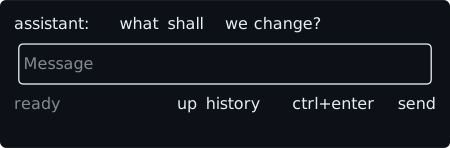
It takes the common attributes plus bind, placeholder, on:change, and on:submit. It needs an id (V012) and takes no content (V013): its text is the value at its bind path, a string. Without bind the runtime keeps the value by id. There is no secret (V002): a hidden text of several lines has no use. Like an input, it cannot stand in a list row or in an each template (V001).
Size
A textarea is one row high when it is empty and grows one row per visual line, up to its max-height, which the built-in sheet sets to 8. After that it scrolls. In a row, it takes the rest of the row (row > textarea { width: 1fr; }), as a composer beside its send button does.
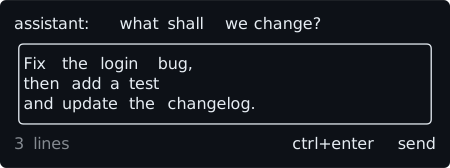
- Its visual lines are the text wrapped at one column less than its width, so the cell after a full line is always there for the caret.
"a\n"has two lines, the second empty. - It moves the layout when it grows: the nodes after it move down, and a modal sized by its content around it grows. An
inputnever does. Give it aheightor amax-heightwhen the layout must not move. - The dump's
scrollis{"y": OFFSET, "h": EXTENT}, the extent being the larger of its rows and its visual lines. The wheel scrolls it without moving the caret,scrollbar: autopaints a thumb on its border, andL006warns when it can never show part of its text. - Next to a
listit is sized by its text and does not share the space with it; the list takes what is left.
Keys
A focused, enabled textarea takes these keys before the keymap sees them. Everything else goes on to the keymap.
- Typing. Every printable key and
space. Keys that arrive together are one edit, with oneon:change. - Deleting.
backspaceandctrl+hdelete the cluster before the caret anddeletethe one after it; either may be a line break.ctrl+udeletes back to the start of the line andctrl+kforward to its end, or the line break at the end of a line that is not the last.ctrl+wandalt+backspacedelete a word backward, or the line break at the start of a line. - Moving.
leftandrightcross line breaks.homeandctrl+ago to the start of the line,endandctrl+eto its end.alt+bandalt+fmove by words, across lines, and so doleftandrightheld withaltorctrl. - Lines.
upanddownmove one visual line to the column the caret last had, andpgupandpgdnmove by as many lines as the textarea has rows. On the first lineupis not taken, and on the lastdownis not: the keymap gets them, so<bind keys="up" action="history_prev" when="#composer:focus"/>recalls the previous message from the first line only.pgupandpgdnare taken only while the textarea scrolls. - Line breaks.
enterfireson:submitwhen the textarea has one, and changes nothing: the host clears the text when it wants to. Withouton:submit,enterinserts a line break.shift+enter,alt+enter, and the LF byte (ctrl+j) always do. - Not taken.
tab,shift+tab,esc,ctrl+enter,ctrl+c, the F keys, and the otherctrl+Xandalt+X, so they can be bound.
Because a textarea takes every printable key, a keymap row for a plain key (y, say, for an approval) never fires while an enabled textarea has focus. Disable the textarea while the row must act (disabled="approval.open"): a disabled textarea takes no focus and no key, and keeps its value.
$ tuimark play composer.tui --data data.json --cols 44 --rows 8 --input "text:hello shift+enter text:world up up enter"
1 typed composer {} "hello"
2 typed composer {} "hello\n"
3 typed composer {} "hello\nworld"
5 history_prev composer {} "hello\nworld"
6 send composer {} "hello\nworld"
Value, caret, and paste
- The caret starts at the end of the text and is a position between two clusters. When the text changes from outside (a
Set, aBatch, anappend, a hostset), the caret goes to the end of the new text, which is where a composer wants it after the host clears it or recalls an older message. A write of the text it already holds is no change. A click focuses the textarea without moving the caret. - The text the host writes is read as run text: escape sequences are removed, each tab becomes four spaces, and other control characters but the line feed are removed. Everything reads that text (the screen, the dump, and the
valueof every event), and the store keeps what the host wrote until the next edit that changes the text, which writes the cleaned text with the edit applied. - A bracketed paste keeps its line breaks and is one edit with one
on:change. A terminal without bracketed paste delivers a paste as keys, so each carriage return is anenterand submits when there is anon:submit; Tuimark does not guess a paste from the timing, so a host that cares waits for a short quiet time before it submits. - There is no undo.
Events
on:change and on:submit carry {"source": ID, "keys": {}, "value": TEXT}, and so does a keymap row fired while the textarea has focus. move-next and the other move-* and check-* built-ins never apply to a textarea; naming one with to= is B007.
A composer
A chat's message box is a textarea with a rule above it and the key hints below it, and the kit ships it as the k-composer template. The host clears the draft before it replies to the composer_submit event, since enter changes nothing in the text, and the caret goes to the end of whatever the host writes:
<use id="composer" template="k-composer" placeholder="Message the model" with="composer as c"/>The textarea is composer__input (the use's id, then the template's), the id a when="#composer__input:focus" and a focus= name. c.draft is the text, and an optional c.disabled flag takes it out of the focus and key order, as the approval in the inline guide needs. composer_change and composer_submit carry the text as value. A host that sends from a parent over the host protocol writes the clear before it replies:
ui.on("composer_submit", async (ev) => {
  await ui.set("composer.draft", ""); // applied before the reply, so the next frame is empty
  await send(String(ev.value));
});
See the kit for the component and its sample.
Key hints and the caret
<hints/> shows the keymap rows a key would fire now. A focused textarea's up and down depend on where the caret is and how the text wraps, which the layout decides, so the hints are chosen once more after layout. In the example above, up history is shown while the caret is on the first line and hidden once the caret is on a later line:
tuimark play composer.tui --data data.json --input "text:a shift+enter" --format jsonThe dump of the focused textarea has a caret member, {"line", "col", "x", "y"}: the caret's line and its column in it, from 0, in columns, then the cell where the terminal's cursor is put (x and y are left out when the caret has been scrolled out of view, and the cursor is hidden). It is on no other node. In tuimark run the runtime paints no caret glyph: the terminal's own cursor shows the caret, so an input method opens its window there.
Widgets
Tuimark's built-in widgets - list, input, checkbox, select, button, progress and spinner, sparkline, table, tabs, hints and modal - with rendered examples, their events and the keys they take.
Templates and composition
Reuse markup in a Tuimark document - split it into files with include and fragment, repeat a piece with template and use, scope its ids, bind each copy to its own data with with, pass it literal text as props and a body through its slot, and read the diagnostics and tool output for what a copy produced.