the kit

Kit components

21 components you copy into your project and own, in the spirit of shadcn: no package, no new tags, every color a token. Each picture is tuimark play on the component’s own document in kit/components, with its sample data, in the kit’s dark or light theme to match this site. The kit guide explains the conventions and the host helpers.

1 copy the two stylesheets

theme.tcss holds the dark and light tokens, kit.tcss the k- classes. Load them first and your own sheet last, so a token you re-declare rebrands the whole kit.

git clone --depth 1 https://github.com/abdul-hamid-achik/tuimark
cp tuimark/kit/theme.tcss tuimark/kit/kit.tcss my-app/
2 load them, then copy a component

Take the markup of any component below; its first line is a contract comment that says which store paths, actions, and keys it needs.

<tui theme="auto">
  <style src="theme.tcss"/>
  <style src="kit.tcss"/>
  <style src="app.tcss"/>   <!-- yours, last: token overrides -->
  …
</tui>

Layout

app bark-appbar

a one-row bar docked to the top

$ tuimark play kit/components/appbar.tui --data kit/components/appbar.sample.json --cols 72 --rows 472×4
an app bar: the product mark and name, the page title, the signed-in user and an environment badge on one rowan app bar: the product mark and name, the page title, the signed-in user and an environment badge on one row
store
reads app.name, app.page, app.user, app.env
needs
k-badge
Markup: components/appbar.tui
kit/components/appbar.tui
<!-- k-appbar · Contract: reads app.name, app.page, app.user, app.env · Actions: none · Keys: none · Requires: k-badge -->
<tui theme="auto">
  <style src="../theme.tcss"/>
  <style src="../kit.tcss"/>
  <screen id="demo">
    <col id="app" width="1fr" height="1fr">
      <!-- COPY: the app bar is a one-row `row` with class `k-appbar`. The
           class docks it to the top of its parent (`dock: top`), so the
           content below it keeps all the remaining space whatever it is.
           Put at most one top-docked bar in a container. -->
      <row class="k-appbar">
        <text class="k-appbar-brand">◆ {app.name}</text>
        <text class="k-appbar-title">{app.page}</text>
        <spacer/>
        <text class="k-appbar-meta">{app.user}</text>
        <text class="k-badge ok">{app.env}</text>
      </row>
      <col width="1fr" height="1fr" pad="1">
        <text class="k-muted">The page content goes here.</text>
      </col>
    </col>
  </screen>
</tui>

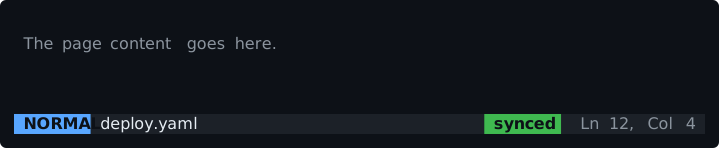
status bark-statusbar

a one-row bar docked to the bottom, with filled segments

$ tuimark play kit/components/statusbar.tui --data kit/components/statusbar.sample.json --cols 72 --rows 672×6
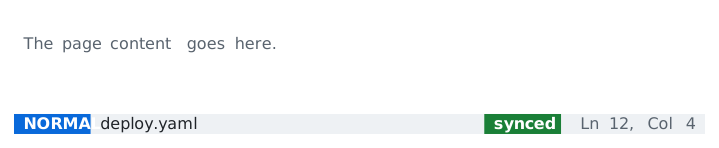
a status bar docked at the bottom: the mode, the file, a synced mark and the cursor positiona status bar docked at the bottom: the mode, the file, a synced mark and the cursor position
store
reads status.mode, status.file, status.synced, status.position
needs
k-muted
Markup: components/statusbar.tui
kit/components/statusbar.tui
<!-- k-statusbar · Contract: reads status.mode, status.file, status.synced, status.position · Actions: none · Keys: none · Requires: k-muted -->
<tui theme="auto">
  <style src="../theme.tcss"/>
  <style src="../kit.tcss"/>
  <screen id="demo">
    <col id="app" width="1fr" height="1fr">
      <col width="1fr" height="1fr" pad="1">
        <text class="k-muted">The page content goes here.</text>
      </col>
      <!-- COPY: the status bar is a one-row `row` with class `k-statusbar`,
           docked to the bottom of its parent. Left segments first, a
           `spacer`, then right segments. `k-statusbar-seg` is a filled chip
           (modifiers: ok, warn, danger); `k-statusbar-text` and
           `k-statusbar-muted` are plain. Only one bottom-docked bar per
           container (L005): put the key hints above it, not docked. -->
      <row class="k-statusbar">
        <text class="k-statusbar-seg">{status.mode}</text>
        <text class="k-statusbar-text">{status.file}</text>
        <spacer/>
        <text class="k-statusbar-seg ok" if="status.synced">synced</text>
        <text class="k-statusbar-seg warn" if="!status.synced">unsynced</text>
        <text class="k-statusbar-muted">{status.position}</text>
      </row>
    </col>
  </screen>
</tui>

tabsk-tabs

a tab strip bound to a path

$ tuimark play kit/components/tabs.tui --data kit/components/tabs.sample.json --cols 72 --rows 872×8
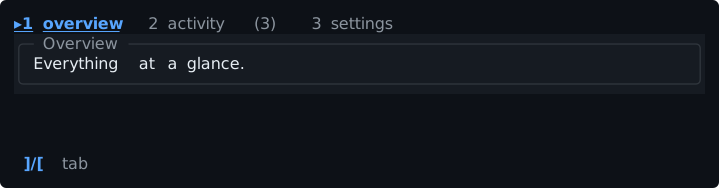
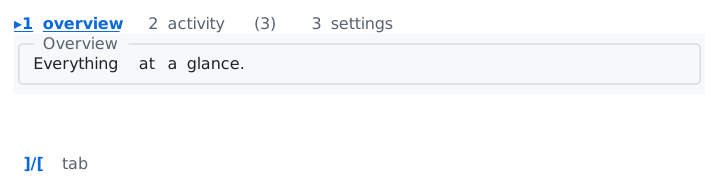
a tab strip with the active tab marked and a count in a tab label, above the active tab’s panela tab strip with the active tab marked and a count in a tab label, above the active tab’s panel
store
reads and writes view (the active tab's id); reads tabs.overview, tabs.activity, tabs.settings, tabs.count
actions
none (the keymap uses the built-ins move-next, move-prev, switch-to)
keys
] and [ move, 1 to 3 switch
needs
k-card, k-hints
Markup: components/tabs.tui
kit/components/tabs.tui
<!-- k-tabs · Contract: reads and writes view (the active tab's id); reads tabs.overview, tabs.activity, tabs.settings, tabs.count · Actions: none (the keymap uses the built-ins move-next, move-prev, switch-to) · Keys: ] and [ move, 1 to 3 switch · Requires: k-card, k-hints -->
<tui theme="auto">
  <style src="../theme.tcss"/>
  <style src="../kit.tcss"/>
  <keymap>
    <bind keys="]" action="move-next" to="#nav" keycap="]/[" label="tab"/>
    <bind keys="[" action="move-prev" to="#nav"/>
    <bind keys="1" action="switch-to" to="#overview"/>
    <bind keys="2" action="switch-to" to="#activity"/>
    <bind keys="3" action="switch-to" to="#settings"/>
  </keymap>
  <screen id="demo">
    <col width="1fr" height="1fr" gap="0">
      <!-- COPY: tabs are a `tabs` with class `k-tabs` bound to a path that
           holds the active tab's id (the host or `switch-to` writes it).
           Write `focusable` on it: whether a tab strip takes focus is then
           your choice, not a default. Each `tab` needs an `id` (yours, not
           a kit part: it is the value of the bound path) and a `label`;
           `short` is the label used when the strip does not fit. The
           generated labels are styled by the class (`.k-tabs > .tab-label`).
           Only the active tab's content is laid out. `mark` is the glyph
           before the active label. -->
      <tabs id="nav" class="k-tabs" bind="view" mark="▸" focusable="true">
        <tab id="overview" label="1 overview" short="1 ovr">
          <box class="k-card" title="Overview">
            <text class="k-card-text">{tabs.overview}</text>
          </box>
        </tab>
        <tab id="activity" label="2 activity ({tabs.count})" short="2 act">
          <box class="k-card" title="Activity">
            <text class="k-card-text">{tabs.activity}</text>
          </box>
        </tab>
        <tab id="settings" label="3 settings" short="3 set">
          <box class="k-card" title="Settings">
            <text class="k-card-text">{tabs.settings}</text>
          </box>
        </tab>
      </tabs>
      <hints class="k-hints"/>
    </col>
  </screen>
</tui>

split panek-split

a list beside a detail card, stacked on a narrow terminal

$ tuimark play kit/components/split.tui --data kit/components/split.sample.json --cols 72 --rows 1072×10
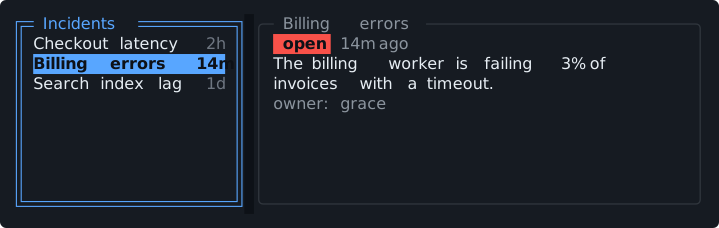
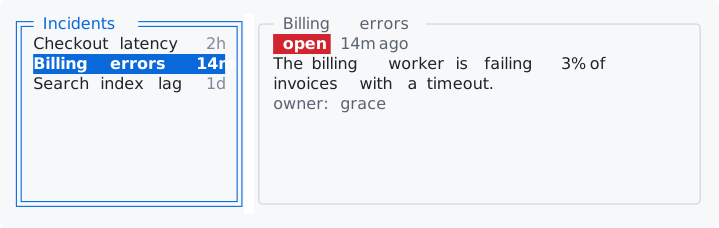
a list of incidents beside a detail pane that shows the selected onea list of incidents beside a detail pane that shows the selected one
store
reads items[] {id, title, age}, detail.{title, status, open, age, summary, owner} (the host keeps detail with a Derive over items and the cursor); reads and writes cur (the cursor row's id)
actions
menu_select
keys
j and k move
needs
k-menu, k-card, k-badge, k-muted
Markup: components/split.tui
kit/components/split.tui
<!-- k-split · Contract: reads items[] {id, title, age}, detail.{title, status, open, age, summary, owner} (the host keeps detail with a Derive over items and the cursor); reads and writes cur (the cursor row's id) · Actions: menu_select · Keys: j and k move · Requires: k-menu, k-card, k-badge, k-muted -->
<tui theme="auto">
  <style src="../theme.tcss"/>
  <style src="../kit.tcss"/>
  <keymap when="#items">
    <bind keys="j" action="move-next"/>
    <bind keys="k" action="move-prev"/>
  </keymap>
  <screen id="demo" focus="#items">
    <!-- COPY: master / detail is a `row` with class `k-split`: a list on the
         left (`k-split-master`, 34% wide, 24 to 40 columns) and a card on
         the right (`k-split-detail`, the rest). The list `bind` is the
         selected id; the host keeps `detail` (a Derive over `items` and the
         cursor) so the right side follows the cursor with no handler.
         The detail card shows the badge for the status through class:NAME
         guards. -->
    <row class="k-split">
      <list id="items" class="k-menu k-split-master" each="items as it" key="it.id" bind="cur" title="Incidents" on:select="menu_select">
        <item>
          <row class="k-menu-row">
            <text class="k-menu-label">{it.title}</text>
            <text class="k-menu-key">{it.age}</text>
          </row>
        </item>
      </list>
      <box class="k-card k-split-detail" title="{detail.title}">
        <row width="1fr" height="1" gap="1">
          <text class="k-badge" class:danger="detail.open" class:ok="!detail.open">{detail.status}</text>
          <text class="k-muted">{detail.age} ago</text>
        </row>
        <text class="k-card-text" wrap="wrap">{detail.summary}</text>
        <text class="k-card-muted">owner: {detail.owner}</text>
      </box>
    </row>
  </screen>
</tui>

key hintsk-hints

the keymap’s labeled rows as a row of hints

$ tuimark play kit/components/hints.tui --cols 72 --rows 672×6
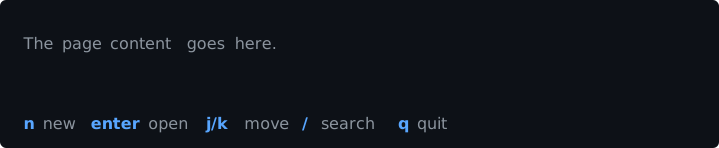
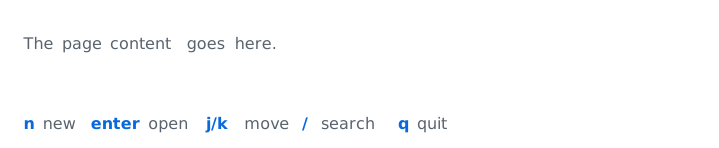
key hints generated from the keymap along the bottom rowkey hints generated from the keymap along the bottom row
store
reads nothing from the store; shows the keymap rows that have a label
actions
none of its own (the demo names item_new, item_open, item_next, item_prev, item_search)
keys
whatever the keymap binds
needs
k-muted
Markup: components/hints.tui
kit/components/hints.tui
<!-- k-hints · Contract: reads nothing from the store; shows the keymap rows that have a label · Actions: none of its own (the demo names item_new, item_open, item_next, item_prev, item_search) · Keys: whatever the keymap binds · Requires: k-muted -->
<tui theme="auto">
  <style src="../theme.tcss"/>
  <style src="../kit.tcss"/>
  <!-- COPY: every keymap row with a `label` becomes a hint. `keycap` is the
       text shown instead of the key (use it for "j/k" or "^S"). A row
       without a label is bound but not shown. -->
  <keymap>
    <bind keys="n" action="item_new" label="new"/>
    <bind keys="enter" action="item_open" label="open"/>
    <bind keys="j" action="item_next" keycap="j/k" label="move"/>
    <bind keys="k" action="item_prev"/>
    <bind keys="/" action="item_search" label="search"/>
    <bind keys="q" action="quit" label="quit"/>
  </keymap>
  <screen id="demo">
    <col id="app" width="1fr" height="1fr">
      <col width="1fr" height="1fr" pad="1">
        <text class="k-muted">The page content goes here.</text>
      </col>
      <!-- COPY: `<hints/>` with class `k-hints`: one row, the key in the
           accent color (`.hint-key`), the label muted (`.hint-label`; the
           class styles both). Hints that do not fit are dropped from the
           right. `scope="active"` (the default) shows only the keys that
           would fire right now. -->
      <hints class="k-hints"/>
    </col>
  </screen>
</tui>

Content

cardk-card

a bordered panel with a title that takes the focus color while it holds focus

$ tuimark play kit/components/card.tui --data kit/components/card.sample.json --cols 72 --rows 1272×12
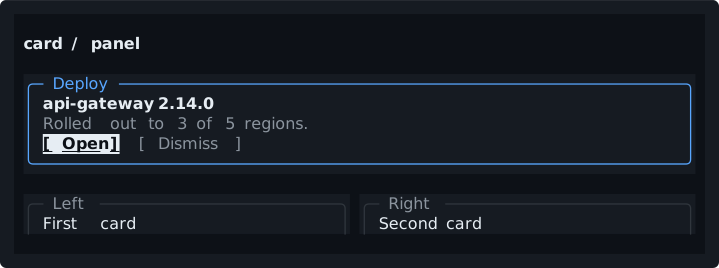
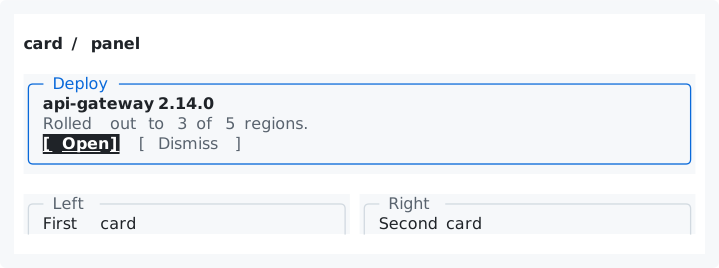
a titled card with a heading, a line of text and two buttons, and two smaller cards side by sidea titled card with a heading, a line of text and two buttons, and two smaller cards side by side
store
reads card.title, card.heading, card.text
actions
card_open, card_dismiss
keys
tab, enter
needs
k-btn, k-title
Markup: components/card.tui
kit/components/card.tui
<!-- k-card · Contract: reads card.title, card.heading, card.text · Actions: card_open, card_dismiss · Keys: tab, enter · Requires: k-btn, k-title -->
<tui theme="auto">
  <style src="../theme.tcss"/>
  <style src="../kit.tcss"/>
  <screen id="demo" focus="#card__open">
    <col width="1fr" height="1fr" gap="1" pad="1">
      <text class="k-title">card / panel</text>
      <!-- COPY: a card is a `box` with class `k-card` and a `title`. The
           border turns to the focus color while anything inside holds focus
           (`.k-card:focus-within`). The class gives it `height: auto` to
           wrap its content; write a number or fr on the box to fix it. -->
      <box class="k-card" title="{card.title}">
        <text class="k-card-title">{card.heading}</text>
        <text class="k-card-muted">{card.text}</text>
        <row class="k-card-actions">
          <button id="card__open" class="k-btn primary" label="Open" on:click="card_open"/>
          <button id="card__dismiss" class="k-btn ghost" label="Dismiss" on:click="card_dismiss"/>
        </row>
      </box>
      <!-- COPY: side-by-side cards share the row; each takes `1fr`. -->
      <row width="1fr" height="auto" gap="1">
        <box class="k-card" title="Left">
          <text class="k-card-text">First card</text>
        </box>
        <box class="k-card" title="Right">
          <text class="k-card-text">Second card</text>
        </box>
      </row>
    </col>
  </screen>
</tui>

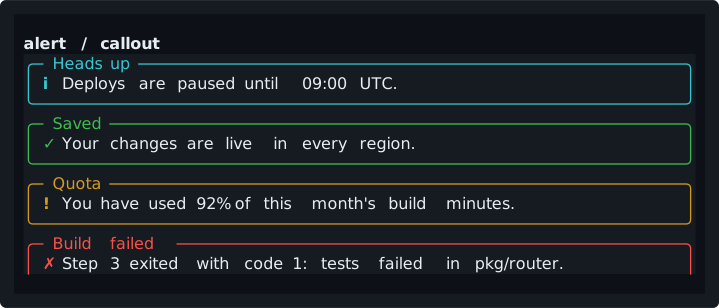
alertk-alert

a callout with an icon, in four status colors

$ tuimark play kit/components/alert.tui --data kit/components/alert.sample.json --cols 72 --rows 1472×14
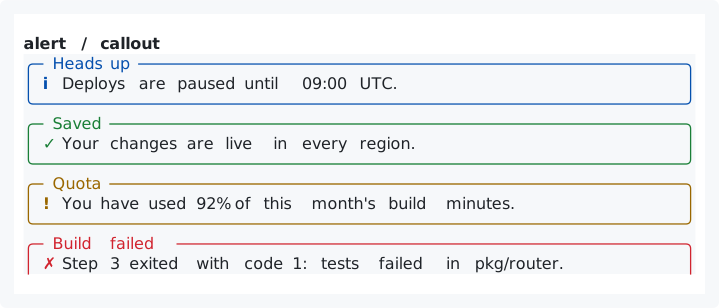
four alerts, info, success, warning and danger, each a titled frame with an icon and a messagefour alerts, info, success, warning and danger, each a titled frame with an icon and a message
store
reads alert.message
needs
k-title
Markup: components/alert.tui
kit/components/alert.tui
<!-- k-alert · Contract: reads alert.message · Actions: none · Keys: none · Requires: k-title -->
<tui theme="auto">
  <style src="../theme.tcss"/>
  <style src="../kit.tcss"/>
  <screen id="demo">
    <col width="1fr" height="1fr" gap="0" pad="1">
      <text class="k-title">alert / callout</text>
      <!-- COPY: an alert is a `box` with class `k-alert` plus a modifier
           (info, ok, warn, danger). The title is the box title; the body
           wraps. `k-alert-icon` takes the same modifier so it matches. -->
      <box class="k-alert info" title="Heads up">
        <row class="k-alert-row">
          <text class="k-alert-icon info">i</text>
          <text class="k-alert-text">Deploys are paused until 09:00 UTC.</text>
        </row>
      </box>
      <box class="k-alert ok" title="Saved">
        <row class="k-alert-row">
          <text class="k-alert-icon ok">✓</text>
          <text class="k-alert-text">Your changes are live in every region.</text>
        </row>
      </box>
      <box class="k-alert warn" title="Quota">
        <row class="k-alert-row">
          <text class="k-alert-icon warn">!</text>
          <text class="k-alert-text">You have used 92% of this month's build minutes.</text>
        </row>
      </box>
      <box class="k-alert danger" title="Build failed">
        <row class="k-alert-row">
          <text class="k-alert-icon danger">✗</text>
          <text class="k-alert-text">{alert.message}</text>
        </row>
      </box>
    </col>
  </screen>
</tui>

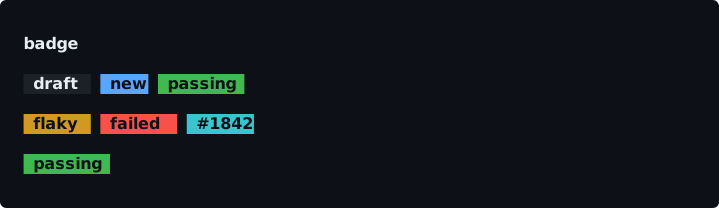
badgek-badge

a short status label, with a modifier for its color

$ tuimark play kit/components/badge.tui --data kit/components/badge.sample.json --cols 72 --rows 972×9
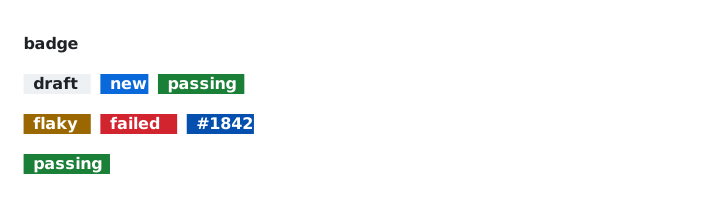
badges for states such as draft, new, passing, flaky and failed, and a build numberbadges for states such as draft, new, passing, flaky and failed, and a build number
store
reads build.number, build.status, build.ok
needs
k-title
Markup: components/badge.tui
kit/components/badge.tui
<!-- k-badge · Contract: reads build.number, build.status, build.ok · Actions: none · Keys: none · Requires: k-title -->
<tui theme="auto">
  <!-- Every kit document loads the sheets in this order: tokens, components, then your own. -->
  <style src="../theme.tcss"/>
  <style src="../kit.tcss"/>
  <screen id="demo">
    <col width="1fr" height="1fr" gap="1" pad="1">
      <text class="k-title">badge</text>
      <!-- COPY: a badge is one text with two classes: `k-badge` and a
           modifier. Modifiers: accent, ok, warn, danger, info (none =
           neutral). The label is literal text or a {path}. -->
      <row width="1fr" height="1" gap="1">
        <text class="k-badge">draft</text>
        <text class="k-badge accent">new</text>
        <text class="k-badge ok">passing</text>
      </row>
      <row width="1fr" height="1" gap="1">
        <text class="k-badge warn">flaky</text>
        <text class="k-badge danger">failed</text>
        <text class="k-badge info">{build.number}</text>
      </row>
      <!-- COPY: choose the modifier from data with class:NAME guards on the
           same node (the guards are paths the host keeps true or false). -->
      <row width="1fr" height="1" gap="1">
        <text class="k-badge" class:ok="build.ok" class:danger="!build.ok">{build.status}</text>
      </row>
    </col>
  </screen>
</tui>

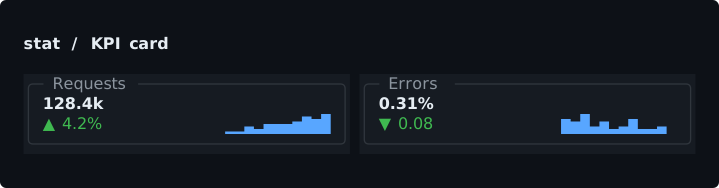
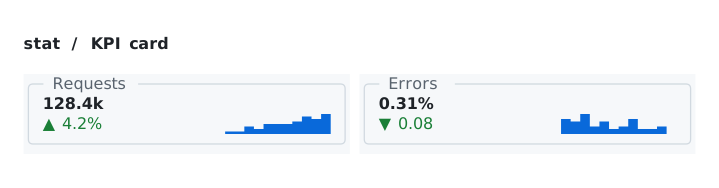
statk-stat

a KPI card with a change and a sparkline

$ tuimark play kit/components/stat.tui --data kit/components/stat.sample.json --cols 72 --rows 872×8
two KPI cards, each with a value, a change marked up or down, and a sparklinetwo KPI cards, each with a value, a change marked up or down, and a sparkline
store
reads stats.req.{value, delta, good, hist[]} and stats.err.{value, delta, good, hist[]}
needs
k-title
Markup: components/stat.tui
kit/components/stat.tui
<!-- k-stat · Contract: reads stats.req.{value, delta, good, hist[]} and stats.err.{value, delta, good, hist[]} · Actions: none · Keys: none · Requires: k-title -->
<tui theme="auto">
  <style src="../theme.tcss"/>
  <style src="../kit.tcss"/>
  <screen id="demo">
    <col width="1fr" height="1fr" gap="1" pad="1">
      <text class="k-title">stat / KPI card</text>
      <!-- COPY: a stat is a `box` with class `k-stat`: the label as the box
           title, the value in bold, and a row with the change
           (`k-stat-delta`, plus `good` or `bad` for green or red; guard it
           with class:good / class:bad: whether a rise is good depends on
           the metric) and a `sparkline` (class `k-stat-spark`) bound to an
           array of numbers. Put stats in a row; each takes `1fr` of the
           width. -->
      <row width="1fr" height="auto" gap="1">
        <box class="k-stat" title="Requests">
          <text class="k-stat-value">{stats.req.value}</text>
          <row class="k-stat-row">
            <text class="k-stat-delta" class:good="stats.req.good" class:bad="!stats.req.good">{stats.req.delta}</text>
            <sparkline class="k-stat-spark" bind="stats.req.hist"/>
          </row>
        </box>
        <box class="k-stat" title="Errors">
          <text class="k-stat-value">{stats.err.value}</text>
          <row class="k-stat-row">
            <text class="k-stat-delta" class:good="stats.err.good" class:bad="!stats.err.good">{stats.err.delta}</text>
            <sparkline class="k-stat-spark" bind="stats.err.hist"/>
          </row>
        </box>
      </row>
    </col>
  </screen>
</tui>

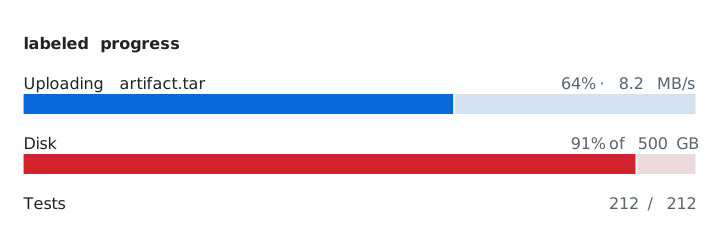
labeled progressk-meter
a label, a value and a bar in eighths

$ tuimark play kit/components/meter.tui --data kit/components/meter.sample.json --cols 72 --rows 1172×11
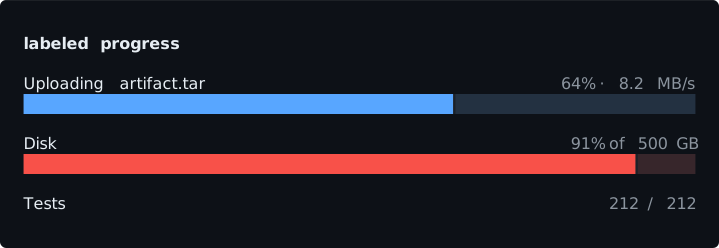
three labeled progress bars with their values: an upload, disk use and teststhree labeled progress bars with their values: an upload, disk use and tests
store
reads meters.upload.{label, text, pct}, meters.disk.{text, pct, warn, crit}, meters.tests.{text, pct} (pct is 0 to 100)
needs
k-title
Markup: components/meter.tui
kit/components/meter.tui
<!-- k-meter · Contract: reads meters.upload.{label, text, pct}, meters.disk.{text, pct, warn, crit}, meters.tests.{text, pct} (pct is 0 to 100) · Actions: none · Keys: none · Requires: k-title -->
<tui theme="auto">
  <style src="../theme.tcss"/>
  <style src="../kit.tcss"/>
  <screen id="demo">
    <col width="1fr" height="1fr" gap="1" pad="1">
      <text class="k-title">labeled progress</text>
      <!-- COPY: a meter is a `col` with class `k-meter`: a head row (label
           on the left, the value text on the right) over a `progress` with
           class `k-meter-bar`. `bind` is a number from 0 to 100. Add a
           status color to the bar with the modifier `ok`, `warn`, or
           `danger`, or pick it from data with class:NAME guards. The host
           updates the number (and the text) as the work advances. -->
      <col class="k-meter">
        <row class="k-meter-head">
          <text class="k-meter-label">{meters.upload.label}</text>
          <spacer/>
          <text class="k-meter-value">{meters.upload.text}</text>
        </row>
        <progress class="k-meter-bar" bind="meters.upload.pct"/>
      </col>
      <col class="k-meter">
        <row class="k-meter-head">
          <text class="k-meter-label">Disk</text>
          <spacer/>
          <text class="k-meter-value">{meters.disk.text}</text>
        </row>
        <progress class="k-meter-bar" class:warn="meters.disk.warn" class:danger="meters.disk.crit" bind="meters.disk.pct"/>
      </col>
      <col class="k-meter">
        <row class="k-meter-head">
          <text class="k-meter-label">Tests</text>
          <spacer/>
          <text class="k-meter-value">{meters.tests.text}</text>
        </row>
        <progress class="k-meter-bar ok" bind="meters.tests.pct"/>
      </col>
    </col>
  </screen>
</tui>

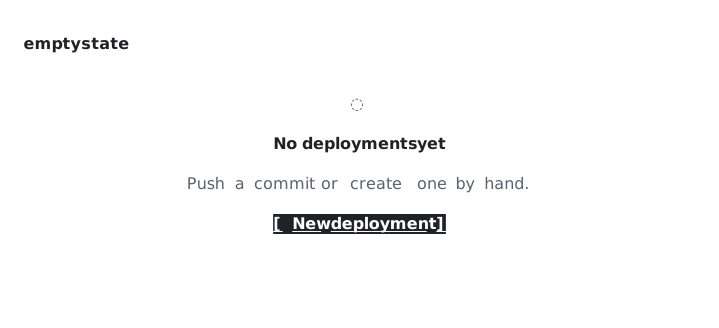
empty statek-empty
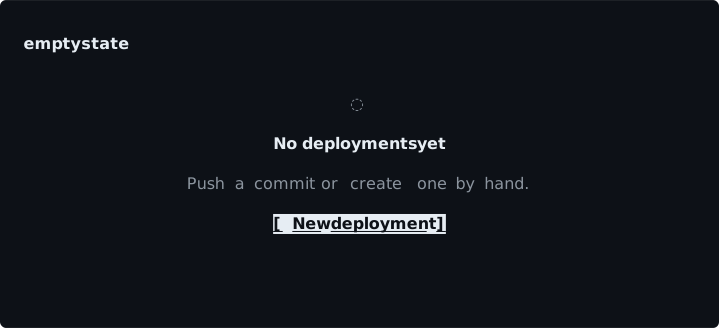
an icon, a title, a line of help and a call to action, centered

$ tuimark play kit/components/empty.tui --data kit/components/empty.sample.json --cols 72 --rows 1572×15
an empty state: an icon, a title, a line of text and a button, centeredan empty state: an icon, a title, a line of text and a button, centered
store
reads empty.title, empty.text
actions
empty_create
keys
enter on the button
needs
k-btn, k-title
Markup: components/empty.tui
kit/components/empty.tui
<!-- k-empty · Contract: reads empty.title, empty.text · Actions: empty_create · Keys: enter on the button · Requires: k-btn, k-title -->
<tui theme="auto">
  <style src="../theme.tcss"/>
  <style src="../kit.tcss"/>
  <screen id="demo" focus="#empty__create">
    <col width="1fr" height="1fr" pad="1">
      <text class="k-title">empty state</text>
      <!-- COPY: an empty state is a `col` with class `k-empty` (it fills the
           space left and centers its children), an icon, a title, one line
           of help, and the call to action (a button label is literal text).
           Show it with `if="!items.any"` next to the list it replaces. -->
      <col class="k-empty">
        <text class="k-empty-icon">◌</text>
        <text class="k-empty-title">{empty.title}</text>
        <text class="k-empty-text">{empty.text}</text>
        <button id="empty__create" class="k-btn primary" label="New deployment" on:click="empty_create"/>
      </col>
    </col>
  </screen>
</tui>

log panelk-log
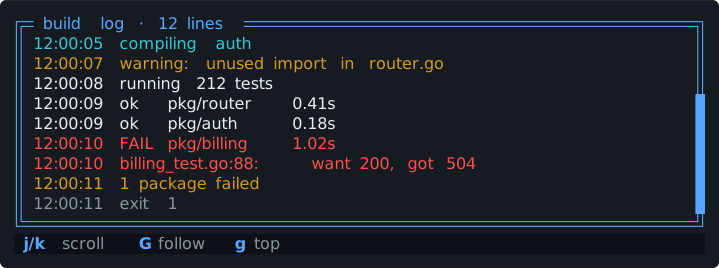
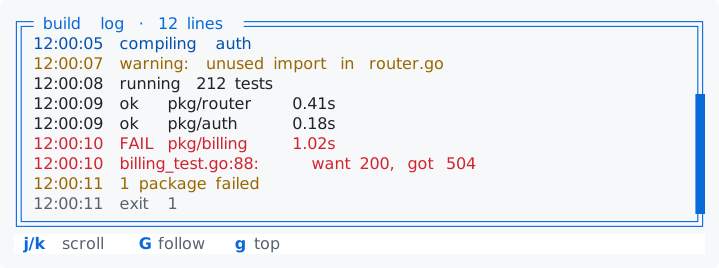
a scrolling log that follows its end

$ tuimark play kit/components/log.tui --data kit/components/log.sample.json --cols 72 --rows 1272×12
a bordered build log with timestamps, a warning and a failed test in color, over its scroll hintsa bordered build log with timestamps, a warning and a failed test in color, over its scroll hints
store
reads log.count, log.lines[] {n, text, debug, info, warn, err}; the host appends lines
actions
log_append (the host's key)
keys
j and k scroll, g top, G follow
needs
k-hints
Markup: components/log.tui
kit/components/log.tui
<!-- k-log · Contract: reads log.count, log.lines[] {n, text, debug, info, warn, err}; the host appends lines · Actions: log_append (the host's key) · Keys: j and k scroll, g top, G follow · Requires: k-hints -->
<tui theme="auto">
  <style src="../theme.tcss"/>
  <style src="../kit.tcss"/>
  <keymap when="#log">
    <bind keys="j" action="move-next" keycap="j/k" label="scroll"/>
    <bind keys="k" action="move-prev"/>
    <bind keys="G" action="move-last" label="follow"/>
    <bind keys="g" action="move-first" label="top"/>
  </keymap>
  <screen id="demo" focus="#log">
    <col width="1fr" height="1fr" gap="0">
      <!-- COPY: a log panel is a `scroll` with class `k-log` and
           `stick="bottom"`: it follows the end of its content as lines are
           appended, until you scroll up to read; `move-last` (or scrolling
           to the end) makes it follow again. It needs an `id` and must be
           focusable to take the keys. The lines are a `col` with
           `each` and a `key`; `height: auto` (the class) lets the column
           be as tall as its lines, which is what the scroll measures.
           Color a line with class:NAME guards: every line carries all the
           flags (a missing path is B002), `false` for the ones it is not.
           The host appends lines to the array (see examples/kit-gallery). -->
      <scroll id="log" class="k-log" stick="bottom" focusable="true" title="build log · {log.count} lines">
        <col class="k-log-lines" each="log.lines as l" key="l.n">
          <text class="k-log-line" class:muted="l.debug" class:info="l.info" class:warn="l.warn" class:danger="l.err">{l.text}</text>
        </col>
      </scroll>
      <hints class="k-hints"/>
    </col>
  </screen>
</tui>
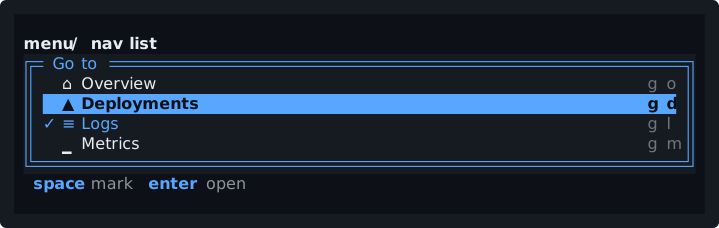
Data and input

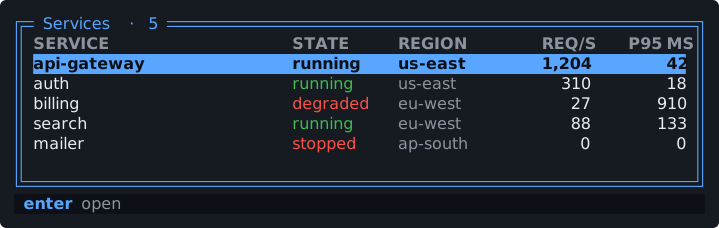
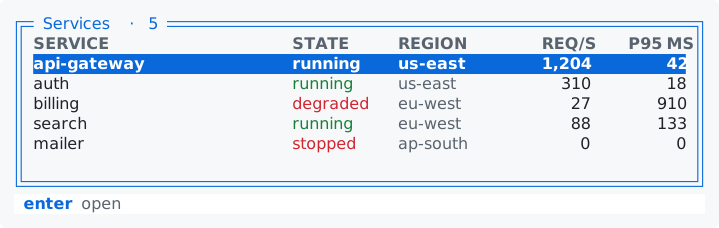
data tablek-table

a table with a header, right-aligned numbers and columns that hide by priority

$ tuimark play kit/components/table.tui --data kit/components/table.sample.json --cols 72 --rows 1072×10
a data table of services with a header, state colors, right-aligned numbers and the cursor row as an accent bara data table of services with a header, state colors, right-aligned numbers and the cursor row as an accent bar
store
reads services[] {id, name, state, ok, region, rps, p95} and count; reads and writes cur (the cursor row's id)
actions
table_select, table_open
keys
j and k move, enter opens
needs
k-hints
Markup: components/table.tui
kit/components/table.tui
<!-- k-table · Contract: reads services[] {id, name, state, ok, region, rps, p95} and count; reads and writes cur (the cursor row's id) · Actions: table_select, table_open · Keys: j and k move, enter opens · Requires: k-hints -->
<tui theme="auto">
  <style src="../theme.tcss"/>
  <style src="../kit.tcss"/>
  <keymap when="#svc">
    <bind keys="j" action="move-next"/>
    <bind keys="k" action="move-prev"/>
    <bind keys="enter" action="table_open" label="open"/>
  </keymap>
  <screen id="demo" focus="#svc">
    <col width="1fr" height="1fr" gap="0">
      <!-- COPY: a data table is a `table` with class `k-table`. The header
           is the `column` titles (bold, muted). Give a `column` the class
           `k-num` for numbers: the header and every cell of it align to the
           right. Columns with `priority` hide, lowest first, when the table
           is too narrow, so give the least important column the smallest
           number, and give the `1fr` column a `min-width` (the class
           `k-table-name`) so columns hide before it is squeezed. `bind`
           receives the cursor row's key; `on:select` fires as the cursor
           moves. The cursor row is bold on a quiet fill while the table is
           idle and a solid accent bar while it has focus. -->
      <table id="svc" class="k-table" each="services as s" key="s.id" bind="cur" title="Services · {count}" placeholder="no services" on:select="table_select">
        <column id="svc__name" class="k-table-name" title="SERVICE" width="1fr">{s.name}</column>
        <column id="svc__state" class="k-table-state" class:ok="s.ok" class:danger="!s.ok" title="STATE" width="9">{s.state}</column>
        <column id="svc__region" class="k-table-muted" title="REGION" width="10" priority="1">{s.region}</column>
        <column id="svc__rps" class="k-num" title="REQ/S" width="8" priority="2">{s.rps}</column>
        <column id="svc__p95" class="k-num" title="P95 MS" width="8" priority="3">{s.p95}</column>
      </table>
      <hints class="k-hints"/>
    </col>
  </screen>
</tui>
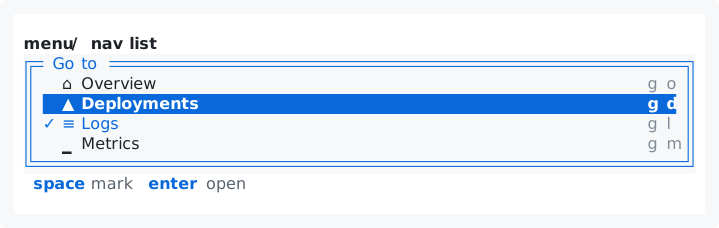
buttonk-btn

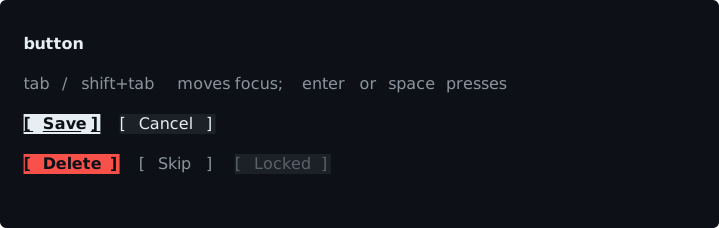
primary, secondary, danger and ghost, inverted when focused

$ tuimark play kit/components/button.tui --data kit/components/button.sample.json --cols 72 --rows 1072×10
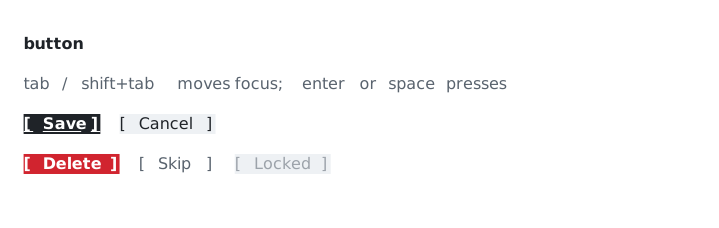
primary, secondary, danger, ghost and disabled buttons, the focused one invertedprimary, secondary, danger, ghost and disabled buttons, the focused one inverted
store
reads last
actions
button_save, button_cancel, button_delete, button_skip
keys
tab and shift+tab move focus, enter or space presses, q quits
needs
k-title, k-subtitle, k-muted
Markup: components/button.tui
kit/components/button.tui
<!-- k-btn · Contract: reads last · Actions: button_save, button_cancel, button_delete, button_skip · Keys: tab and shift+tab move focus, enter or space presses, q quits · Requires: k-title, k-subtitle, k-muted -->
<tui theme="auto">
  <style src="../theme.tcss"/>
  <style src="../kit.tcss"/>
  <keymap>
    <bind keys="ctrl+c,q" action="quit"/>
  </keymap>
  <screen id="demo" focus="#buttons__primary">
    <col width="1fr" height="1fr" gap="1" pad="1">
      <text class="k-title">button</text>
      <text class="k-subtitle">tab / shift+tab moves focus; enter or space presses</text>
      <!-- COPY: a button is `k-btn` plus a modifier: primary, secondary,
           danger, ghost. `on:click` names the action (component_verb); the
           host implements it. The focused button is drawn inverted, bold and
           underlined (see `.k-btn:focus`). -->
      <row width="1fr" height="1" gap="2">
        <button id="buttons__primary" class="k-btn primary" label="Save" on:click="button_save"/>
        <button id="buttons__secondary" class="k-btn secondary" label="Cancel" on:click="button_cancel"/>
      </row>
      <row width="1fr" height="1" gap="2">
        <button id="buttons__danger" class="k-btn danger" label="Delete" on:click="button_delete"/>
        <button id="buttons__ghost" class="k-btn ghost" label="Skip" on:click="button_skip"/>
        <button id="buttons__off" class="k-btn secondary" label="Locked" disabled="true"/>
      </row>
      <text class="k-muted">last action: {last}</text>
    </col>
  </screen>
</tui>
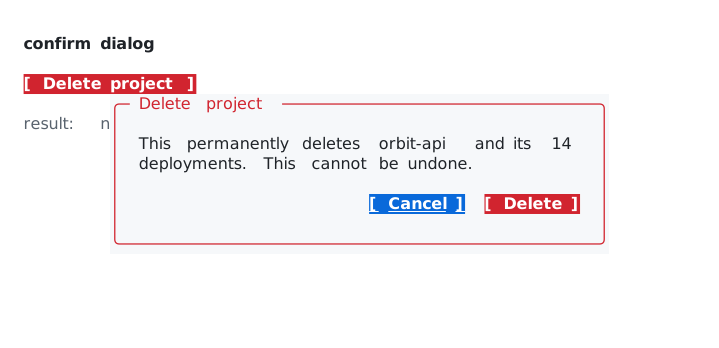
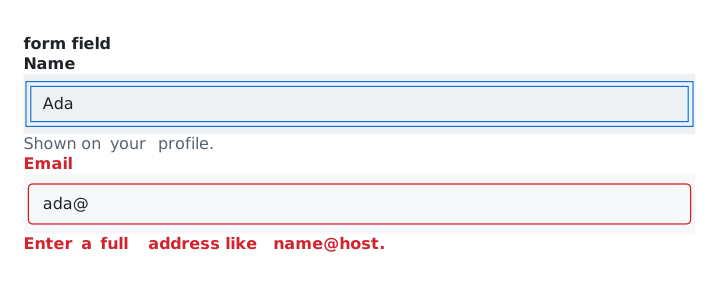
form fieldk-field

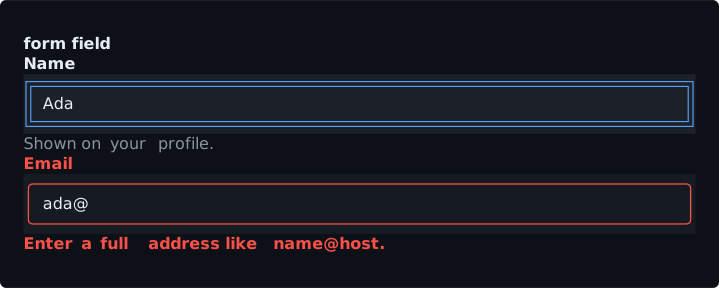
a label, an input, help text and an error line, with invalid styling

$ tuimark play kit/components/field.tui --data kit/components/field.sample.json --cols 72 --rows 1372×13
a form with a focused name field and an email field showing its error messagea form with a focused name field and an email field showing its error message
store
reads and writes forms.profile.{name,email}.value; reads forms.profile.{name,email}.error ("" when fine; the host writes them); the host also writes forms.profile.valid, which the markup does not read
actions
form_validate, form_submit
keys
ctrl+s saves, enter in an input submits
needs
k-btn, k-hints, k-title
Markup: components/field.tui
kit/components/field.tui
<!-- k-field · Contract: reads and writes forms.profile.{name,email}.value; reads forms.profile.{name,email}.error ("" when fine; the host writes them); the host also writes forms.profile.valid, which the markup does not read · Actions: form_validate, form_submit · Keys: ctrl+s saves, enter in an input submits · Requires: k-btn, k-hints, k-title -->
<tui theme="auto">
  <style src="../theme.tcss"/>
  <style src="../kit.tcss"/>
  <keymap>
    <bind keys="ctrl+s" action="form_submit" keycap="^S" label="save"/>
  </keymap>
  <screen id="demo" focus="#profile__name">
    <col width="1fr" height="1fr" gap="0" pad="1">
      <text class="k-title">form field</text>
      <!-- COPY: a field is a `col` with class `k-field`: a label, an `input`
           with class `k-field-input`, help text, and an error line. The
           input has its own border (and height 3), which is what lets
           `:focus` change `border-color`; an input without `border` cannot
           show focus that way. The form is named by the id prefix: the
           inputs are `profile__name` and `profile__email`, and the store
           holds `forms.profile.<field>.value` and `.error`. The host writes
           the error ("" when fine): `class:invalid` turns the label and the
           border red, and the error line shows only while the path is
           non-empty. `forms.profile.valid` (true when no rule fails) is the
           host's too; the markup does not need it. -->
      <col class="k-field">
        <text class="k-field-label" class:invalid="forms.profile.name.error">Name</text>
        <input id="profile__name" class="k-field-input" class:invalid="forms.profile.name.error" bind="forms.profile.name.value" placeholder="your name" on:change="form_validate" on:submit="form_submit"/>
        <text class="k-field-help" if="!forms.profile.name.error">Shown on your profile.</text>
        <text class="k-field-error" if="forms.profile.name.error">{forms.profile.name.error}</text>
      </col>
      <col class="k-field">
        <text class="k-field-label" class:invalid="forms.profile.email.error">Email</text>
        <input id="profile__email" class="k-field-input" class:invalid="forms.profile.email.error" bind="forms.profile.email.value" placeholder="you@example.com" on:change="form_validate" on:submit="form_submit"/>
        <text class="k-field-help" if="!forms.profile.email.error">We never share it.</text>
        <text class="k-field-error" if="forms.profile.email.error">{forms.profile.email.error}</text>
      </col>
      <row width="1fr" height="1" gap="2">
        <button id="profile__save" class="k-btn primary" label="Save" on:click="form_submit"/>
        <hints class="k-hints"/>
      </row>
    </col>
  </screen>
</tui>
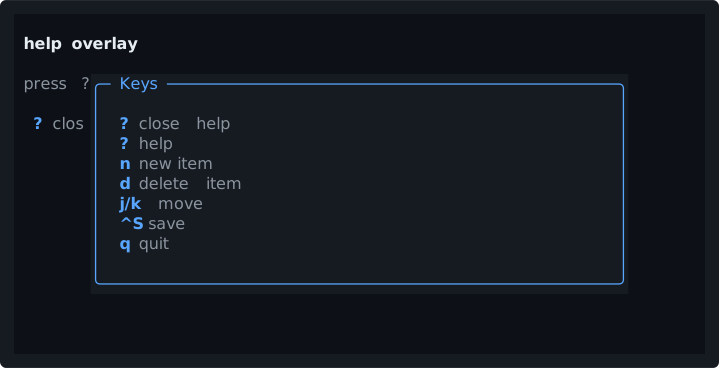
Overlays

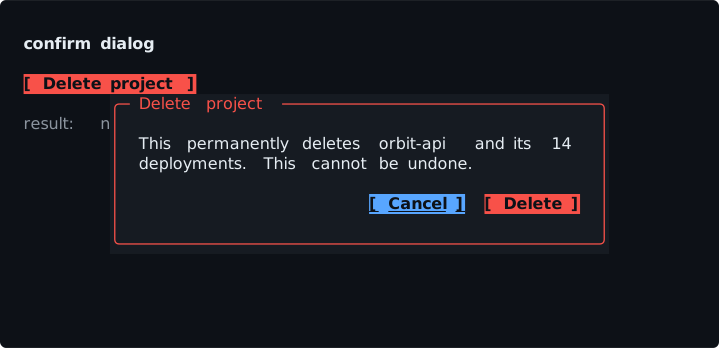
confirm dialogk-dialog

a modal that puts the cursor on the safe button

$ tuimark play kit/components/confirm.tui --data kit/components/confirm.sample.json --cols 72 --rows 1672×16
a confirm dialog over the page asking to delete a project, with Cancel and Delete buttonsa confirm dialog over the page asking to delete a project, with Cancel and Delete buttons
store
reads confirm.open, confirm.title, confirm.message; the host writes confirm.open and confirm.result
actions
dialog_open, dialog_confirm, dialog_cancel
keys
y confirms, n and esc cancel
needs
k-btn, k-title, k-muted
Markup: components/confirm.tui
kit/components/confirm.tui
<!-- k-dialog · Contract: reads confirm.open, confirm.title, confirm.message; the host writes confirm.open and confirm.result · Actions: dialog_open, dialog_confirm, dialog_cancel · Keys: y confirms, n and esc cancel · Requires: k-btn, k-title, k-muted -->
<tui theme="auto">
  <style src="../theme.tcss"/>
  <style src="../kit.tcss"/>
  <!-- The overlay's own keys come first: the first matching row in document
       order wins, so they must precede any global row. `when=".k-dialog"`
       holds while focus is anywhere inside a dialog. The host tells the
       instance apart by the prefix of the event's source before the last
       "__" (confirm__yes: the instance is "confirm"). -->
  <keymap when=".k-dialog">
    <bind keys="y" action="dialog_confirm" label="confirm"/>
    <bind keys="n" action="dialog_cancel" label="cancel"/>
  </keymap>
  <screen id="demo" focus="#confirm__open">
    <col width="1fr" height="1fr" gap="1" pad="1">
      <text class="k-title">confirm dialog</text>
      <row width="1fr" height="1" gap="2">
        <button id="confirm__open" class="k-btn danger" label="Delete project" on:click="dialog_open"/>
      </row>
      <text class="k-muted">result: {confirm.result}</text>
    </col>
    <!-- COPY: a confirm dialog is a `modal` with class `k-dialog` (add
         `danger` for a destructive one), the message, and an action row of
         `k-dialog-actions` (height 1). The modal must be the LAST child of
         the screen (L004). `open` is a path the host flips; `focus` puts the
         cursor on the SAFE button, so a stray enter cancels. `on:escape`
         cancels. y / n work too (the keymap above). The class writes the
         modal's size (52 columns, as tall as its content, at most the
         screen). Keep the button labels short: the action row must fit a
         40-column terminal. -->
    <modal id="confirm__dialog" class="k-dialog danger" open="confirm.open" title="{confirm.title}" focus="#confirm__no" on:escape="dialog_cancel">
      <text class="k-dialog-text">{confirm.message}</text>
      <row class="k-dialog-actions">
        <spacer/>
        <button id="confirm__no" class="k-btn secondary" label="Cancel" on:click="dialog_cancel"/>
        <button id="confirm__yes" class="k-btn danger" label="Delete" on:click="dialog_confirm"/>
      </row>
    </modal>
  </screen>
</tui>

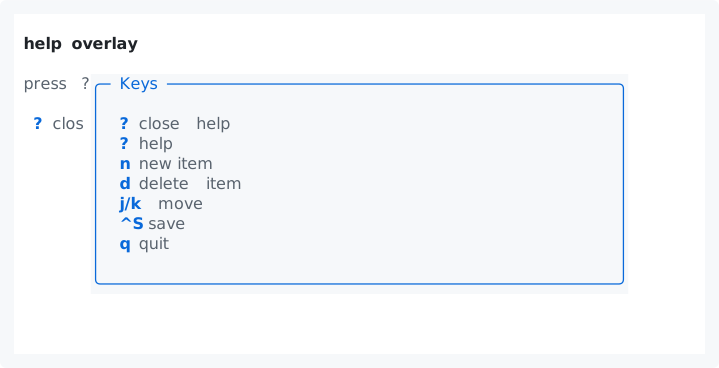
help overlayk-help

a modal that lists every labeled key

$ tuimark play kit/components/help.tui --data kit/components/help.sample.json --cols 72 --rows 1772×17
a help overlay listing every labeled key bindinga help overlay listing every labeled key binding
store
reads help.open; lists every keymap row that has a label
actions
help_open, help_close (the demo also names item_new, item_delete, item_next, item_prev, item_save)
keys
? opens, q and ? close
needs
k-hints, k-title, k-muted
Markup: components/help.tui
kit/components/help.tui
<!-- k-help · Contract: reads help.open; lists every keymap row that has a label · Actions: help_open, help_close (the demo also names item_new, item_delete, item_next, item_prev, item_save) · Keys: ? opens, q and ? close · Requires: k-hints, k-title, k-muted -->
<tui theme="auto">
  <style src="../theme.tcss"/>
  <style src="../kit.tcss"/>
  <!-- The overlay's own keys come first (the first matching row in document
       order wins), so q and ? close the help instead of reaching the global
       rows below. `when=".k-help"` holds while the help modal is on top. -->
  <keymap when=".k-help">
    <bind keys="q,?" action="help_close" keycap="?" label="close help"/>
  </keymap>
  <!-- COPY: the help overlay lists every keymap row that has a `label`.
       Give rows a `keycap` to show "j/k" or "^S" instead of the raw key. -->
  <keymap>
    <bind keys="?" action="help_open" label="help"/>
    <bind keys="n" action="item_new" label="new item"/>
    <bind keys="d" action="item_delete" label="delete item"/>
    <bind keys="j" action="item_next" keycap="j/k" label="move"/>
    <bind keys="k" action="item_prev"/>
    <bind keys="ctrl+s" action="item_save" keycap="^S" label="save"/>
    <bind keys="q" action="quit" label="quit"/>
  </keymap>
  <screen id="demo">
    <col width="1fr" height="1fr" gap="1" pad="1">
      <text class="k-title">help overlay</text>
      <text class="k-muted">press ? for the keys</text>
      <hints class="k-hints"/>
    </col>
    <!-- COPY: a modal with class `k-help` that holds `<hints scope="all">`.
         `scope="all"` lists every labeled row, not only the ones that would
         fire right now. `k-help-keys` stacks them in a column. The class
         writes the modal's size (56 columns, as tall as its content). -->
    <modal id="help__dialog" class="k-help" open="help.open" title="Keys" on:escape="help_close">
      <hints class="k-hints k-help-keys" scope="all"/>
    </modal>
  </screen>
</tui>

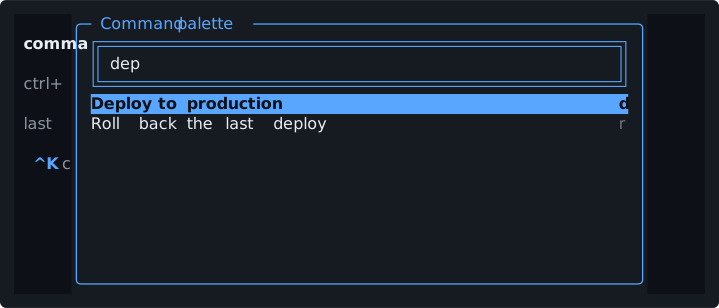
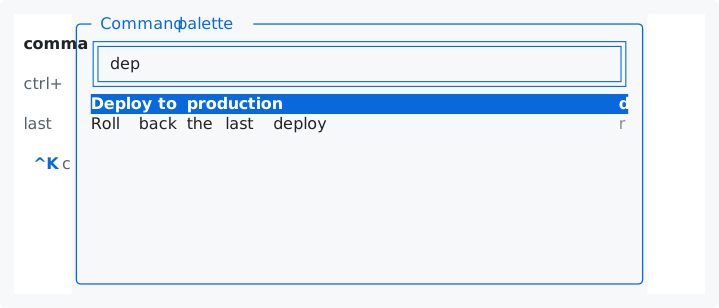
command palettek-palette

a modal with an input over a filtered list

$ tuimark play kit/components/palette.tui --data kit/components/palette.sample.json --cols 72 --rows 1472×14
a command palette with a query typed and the matching commands listeda command palette with a query typed and the matching commands listed
store
reads palette.commands[], palette.query, found.items[] and found.any (the host keeps found with a Derive over palette.query and palette.commands); reads and writes palette.open, palette.query, palette.cur; reads palette.last
actions
palette_open, palette_run, palette_close, palette_query (fires as the query changes; a Go host that filters with Derive needs no work in it, a TypeScript parent recomputes found there)
keys
ctrl+k opens, up and down (or ctrl+p and ctrl+n) move, enter runs, esc closes
needs
k-hints, k-title, k-muted
Markup: components/palette.tui
kit/components/palette.tui
<!-- k-palette · Contract: reads palette.commands[], palette.query, found.items[] and found.any (the host keeps found with a Derive over palette.query and palette.commands); reads and writes palette.open, palette.query, palette.cur; reads palette.last · Actions: palette_open, palette_run, palette_close, palette_query (fires as the query changes; a Go host that filters with Derive needs no work in it, a TypeScript parent recomputes found there) · Keys: ctrl+k opens, up and down (or ctrl+p and ctrl+n) move, enter runs, esc closes · Requires: k-hints, k-title, k-muted -->
<tui theme="auto">
  <style src="../theme.tcss"/>
  <style src="../kit.tcss"/>
  <!-- The overlay's own keys come first (the first matching row in document
       order wins). While the palette is open, up / down (and ctrl+n /
       ctrl+p) move the cursor of the list although focus stays in the
       input: the input does not consume them, so they reach the keymap, and
       the built-ins act on the list named by `to`. Enter is the input's
       `on:submit`; esc is the modal's `on:escape`. -->
  <keymap when=".k-palette">
    <bind keys="down,ctrl+n" action="move-next" to="#palette__list"/>
    <bind keys="up,ctrl+p" action="move-prev" to="#palette__list"/>
  </keymap>
  <keymap>
    <bind keys="ctrl+k" action="palette_open" keycap="^K" label="commands"/>
  </keymap>
  <screen id="demo">
    <col width="1fr" height="1fr" gap="1" pad="1">
      <text class="k-title">command palette</text>
      <text class="k-muted">ctrl+k opens it; type, up / down, enter, esc.</text>
      <text class="k-muted">last command: {palette.last}</text>
      <hints class="k-hints"/>
    </col>
    <!-- COPY: a modal with class `k-palette`: an input bound to the query,
         and a list over the filtered commands. The filtering is the HOST's
         job (no expressions in the markup): keep `found` with a Derive over
         `palette.query` and `palette.commands`, so the list always reads the
         result. The list `bind` is the cursor row's id. The class writes the
         modal's size (60 by 16, at most the screen). -->
    <modal id="palette__dialog" class="k-palette" open="palette.open" title="Command palette" focus="#palette__q" on:escape="palette_close">
      <input id="palette__q" class="k-palette-input" bind="palette.query" placeholder="type a command…" on:change="palette_query" on:submit="palette_run"/>
      <text class="k-palette-empty" if="!found.any">No command matches “{palette.query}”.</text>
      <list id="palette__list" class="k-palette-list" each="found.items as r" key="r.id" bind="palette.cur" focusable="false">
        <item>
          <row class="k-palette-row">
            <text class="k-palette-label">{r.label}</text>
            <text class="k-palette-hint">{r.hint}</text>
          </row>
        </item>
      </list>
    </modal>
  </screen>
</tui>

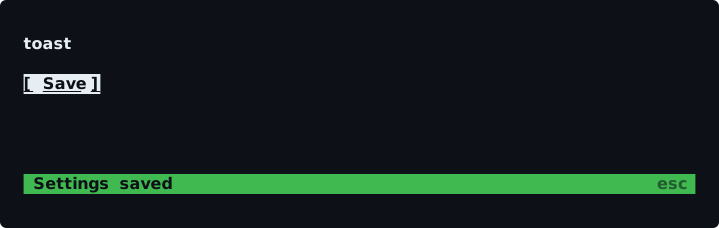
toastk-toast

a one-row notice that never moves the page

$ tuimark play kit/components/toast.tui --data kit/components/toast.sample.json --cols 72 --rows 1072×10
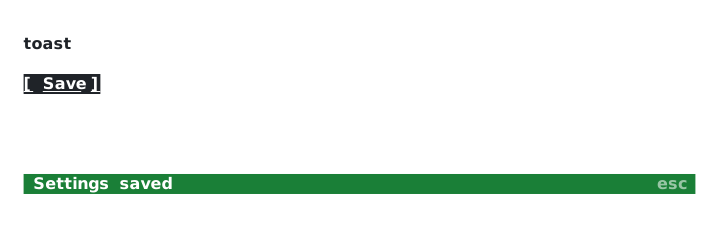
a toast along the bottom row saying the settings were saved, with esc to dismissa toast along the bottom row saying the settings were saved, with esc to dismiss
store
reads toast.show, toast.text, toast.is_ok, toast.is_warn, toast.is_danger; the host clears toast.show after a few seconds
actions
toast_show, toast_dismiss
keys
esc dismisses
needs
k-btn, k-title
Markup: components/toast.tui
kit/components/toast.tui
<!-- k-toast · Contract: reads toast.show, toast.text, toast.is_ok, toast.is_warn, toast.is_danger; the host clears toast.show after a few seconds · Actions: toast_show, toast_dismiss · Keys: esc dismisses · Requires: k-btn, k-title -->
<tui theme="auto">
  <style src="../theme.tcss"/>
  <style src="../kit.tcss"/>
  <keymap>
    <bind keys="esc" action="toast_dismiss" label="dismiss"/>
  </keymap>
  <screen id="demo" focus="#toast__show">
    <col width="1fr" height="1fr" gap="1" pad="1">
      <text class="k-title">toast</text>
      <row width="1fr" height="1" gap="2">
        <button id="toast__show" class="k-btn primary" label="Save" on:click="toast_show"/>
      </row>
      <spacer/>
      <!-- COPY: a toast is a one-row strip. `k-toast-slot` is a row that is
           always one row high, so the page never jumps when the toast
           appears; the `k-toast` row inside shows only while `toast.show`
           is true. Info is the default; guard the modifiers `ok`, `warn`,
           `danger` with class:NAME. The HOST clears it: set `toast.show`
           back to false from an `Every` tick (see
           examples/kit-gallery/main.go). The slot is not docked, so it can
           sit above a docked status bar (only one bottom-docked bar per
           container, L005). -->
      <row class="k-toast-slot">
        <row class="k-toast" if="toast.show" class:ok="toast.is_ok" class:warn="toast.is_warn" class:danger="toast.is_danger">
          <text class="k-toast-text">{toast.text}</text>
          <text class="k-toast-key">esc</text>
        </row>
      </row>
    </col>
  </screen>
</tui>