Widgets
Tuimark has a small, fixed set of widgets. Each one below is shown with a document you can copy and the frame it renders; the pictures come from tuimark play on exactly these files. All of them share one data.json:
data.json
{
  "query": "",
  "cursor": "internal/app.go",
  "marked": ["go.mod"],
  "files": [
    { "path": "cmd/app/main.go" },
    { "path": "internal/app.go" },
    { "path": "go.mod" },
    { "path": "README.md" }
  ],
  "build": {
    "pct": 62,
    "hist": [12, 18, 25, 22, 40, 52, 47, 63, 71, 66, 80, 92, 88, 70, 64, 75, 90, 97, 85, 78, 60, 55, 49, 62, 68, 74, 81, 77, 72, 69]
  },
  "cpu_cursor": 9921,
  "procs": [
    { "pid": 412, "name": "WindowServer", "cpu": "87.3", "mem": "1.4G", "hot": true },
    { "pid": 8810, "name": "Code Helper", "cpu": "41.8", "mem": "904M", "hot": true },
    { "pid": 9921, "name": "node", "cpu": "18.2", "mem": "388M", "hot": false },
    { "pid": 15023, "name": "go", "cpu": "9.7", "mem": "221M", "hot": false }
  ],
  "view": "processes"
}
list
A focusable list with a cursor. Its rows come from each over an array, or from static <item> children.
<tui>
  <style>
    #files { border: rounded; }
    #files > item:checked { color: $accent; }
  </style>
  <keymap>
    <bind keys="space" action="check-toggle" when="#files:focus"/>
  </keymap>
  <screen id="main" focus="#files">
    <list id="files" each="files as f" key="f.path" bind="cursor"
          checked="marked" mark="✓" on:select="preview" on:change="marks_changed">
      <item>
        <text>{f.path}</text>
      </item>
    </list>
  </screen>
</tui>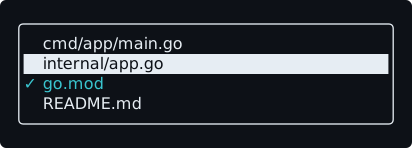
bindholds the cursor row's key;on:selectfires when the cursor moves. A focused list takesup,down,home,end,pgup, andpgdn.- The cursor row is
:selected, reversed by the built-in sheet (list > item:selected { reverse: true; }). - Multi-select (version 2):
checked="path"holds the keys of the checked rows, an array the runtime reads and writes;mark="✓"reserves room for the mark at the start of every row;on:changefires with the new array. Checked rows match:checked. Bind the keys yourself with thecheck-toggle,check-all, andcheck-nonebuilt-ins. - Rows do not take focus: a row cannot hold an
input,button,list, ormodal. Act on the cursor row withon:select, or with a keymap row scoped to the list, whose event names the row. - Without a size, a list fits its rows into the space left and scrolls (auto-fit);
scrollbar: autoshows where you are.
input
A single-line text field. bind holds its text.
<tui>
  <style>
    #q { border: rounded; }
    #q:focus { border-color: $focus; }
  </style>
  <screen id="main" focus="#q">
    <input id="q" bind="query" placeholder="filter files" on:change="filter" on:submit="apply"/>
  </screen>
</tui>
placeholdershows, dimmed, while it is empty.secret="true"paints one•per character, and keeps the text out ofTUIMARK_LOG.on:changefires with the new text as the event's value;on:submitfires onenter.- A focused input takes printable keys,
space,backspace,left,right,home,end,ctrl+a,ctrl+e,ctrl+h, andctrl+ubefore the keymap sees them, so typing never triggers shortcuts. A paste arrives as one edit and oneon:change. - An input is one row of text. With a border it is three rows tall, as above; a
height: 1would leave the border no room.
button
<button id="deploy" label="Deploy" on:click="ask_deploy"/>
<button id="approve" on:click="approve">Approve</button>
The label comes from label or the body, painted as [ Deploy ]. A focused button fires on:click on enter or space, and on a mouse click. Show focus with button:focus { reverse: true; }.
progress and sparkline
A progress is a bar from 0 to 100, from bind or a literal value. A sparkline (version 2) draws the last values of a numeric array as bars, one column per value and eight levels per row.
<tui>
  <style>
    .meter { height: 1; gap: 1; }
    .label { width: 8; }
    progress { width: 1fr; }
    #fine { bar: eighths; color: $accent; }
    #spark { height: 2; color: $ok; }
  </style>
  <screen id="main">
    <row class="meter">
      <text class="label">block</text>
      <progress bind="build.pct"/>
    </row>
    <row class="meter">
      <text class="label">eighths</text>
      <progress id="fine" bind="build.pct"/>
    </row>
    <row class="meter">
      <text class="label">value</text>
      <progress value="25"/>
    </row>
    <sparkline id="spark" bind="build.hist" min="0" max="100"/>
  </screen>
</tui>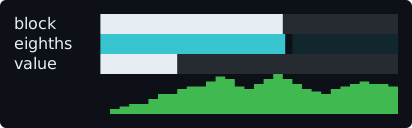
bar: eighths(version 2) fills eighths of a cell for a smoother bar;bar: block, the default, fills whole cells.- A sparkline is naturally one column per value and one row tall; give it a
heightfor more levels. Values are right-aligned in the width it gets,nullis a gap, andminandmaxfix the range (otherwise the shown values set it). - The bar color is the widget's
color. scale="NAME"(version="3") shares a range across every sparkline of one frame that carries the same name: they all takelo/hifrom the smallest and largest of their shown values together, so a group of related gauges reads on one scale. A sparkline's ownmin/maxstill wins for that one; an inactive tab's sparkline is not in the group.
table
Rows of an array, in columns, with a cursor (version 2). Each <column> has a header title and a body that is the cell template.
<tui>
  <style>
    #procs { border: rounded; gap: 1; }
    #procs > column { bold: true; }
    .num { content-align: end; }
    #c-name { width: 1fr; }
    #procs > item > text.hot { color: $warn; }
    @media (max-cols: 40) { #c-mem { display: none; } }
  </style>
  <screen id="main" focus="#procs">
    <table id="procs" each="procs as p" key="p.pid" bind="cpu_cursor" on:select="moved">
      <column id="c-pid" class="num" title="PID" width="6">{p.pid}</column>
      <column id="c-name" title="NAME">{p.name}</column>
      <column id="c-cpu" class="num" title="CPU%" width="5" class:hot="p.hot">{p.cpu}</column>
      <column id="c-mem" class="num" title="MEM" width="5">{p.mem}</column>
    </table>
  </screen>
</tui>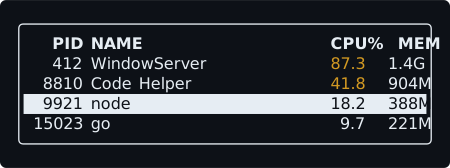
- It keeps a cursor like a list:
bindholds the cursor row's key,on:selectfires with the row inkeys, and a focused table takes the arrow and paging keys.checked,mark, and thecheck-*built-ins work as on a list. - Column widths: a number of cells; a
%of the table; anfrshare of what is left, clamped bymin-widthandmax-width; or, by default, the widest of the title and every cell. - Styling: a rule on a column styles its header cell. Body cells carry the column's
classand itsclass:NAMEguards, evaluated per row, so.num { content-align: end; }right-aligns a whole column and#procs > item > text.hotcolors only the hot cells. One attribute-only<item class:blocked="p.protected"/>styles whole rows. - Only the rows in view are laid out, painted, and dumped, so a table of thousands of rows costs what its visible rows cost.
- Cells never wrap.
placeholdershows on the first row when the array is empty. display: noneon a column hides it. Under@media, that is how a table drops columns on a narrow terminal. The same document at 30 columns:
╭────────────────────────────╮
│   PID NAME             CPU%│
│   412 WindowServer     87.3│
│  8810 Code Helper      41.8│
│  9921 node             18.2│
│ 15023 go                9.7│
╰────────────────────────────╯
A column with on:click fires when its header is clicked, the natural place for sorting.
priority="N"(version="3") hides a column automatically when the visible columns no longer fit: the column with the smallestNhides first (a non-negative integer; the last one in document order breaks a tie), and it comes back once the table is wide enough again. A hidden column is exactly adisplay: noneone — no header cell, no body cells — but it still counts toward the table's intrinsic width. Preferpriorityto@mediarules for column hiding; a column withoutprioritynever hides this way.
tabs
A strip of tab labels over the content of the active tab (version 2).
<tui>
  <style>
    .tab-label { color: $muted; }
    .tab-label:selected { color: $accent; bold: true; }
  </style>
  <keymap>
    <bind keys="right" action="move-next" to="#views"/>
    <bind keys="left" action="move-prev" to="#views"/>
  </keymap>
  <screen id="main">
    <tabs id="views" bind="view" mark="▸" gap="2" on:select="view_changed">
      <tab id="overview" label="1 overview" short="1 ovr">
        <text>panels</text>
      </tab>
      <tab id="processes" label="2 processes" short="2 proc">
        <text>the process table</text>
      </tab>
      <tab id="settings" label="3 settings" short="3 cfg">
        <text>settings</text>
      </tab>
    </tabs>
  </screen>
</tui>
- With
bind, the active tab is the one whose id is the bound string, and activating a tab writes its id there;on:selectfires with the id as the value. Withoutbind, the runtime remembers the tab. - Tabs switch with the
switch-to,move-next, andmove-prevbuilt-ins, withleftandrighton afocusable="true"tabs, with a click on a label, and when focus moves into an inactive tab. - Only the active tab is laid out; widgets in the others keep their state (a list's cursor, an input's text).
- When a tab becomes active while focus was in the old tab, on the strip, or nowhere, focus moves to the new tab's
focus="#id"target, or its first focusable node. - Labels always fit. Every
labelwhen there is room, else everyshort, else only the active tab as‹ label ›. The same strip at 24 and 16 columns:
 1 ovr  ▸2 proc   3 cfg
the process table▸‹ 2 processes ›
the process tablLabels are generated text nodes with the class tab-label, :selected on the active one; style them with .tab-label.
In version="3", label and short are templates, resolved every frame exactly like a <text> body ({path}, no expressions), so a tab can show a live count: <tab id="alerts" label="alerts ({count})" short="⚠ {count}">. A missing path resolves to empty, and any line break in the resolved value becomes a space, since a label is one row. In version="1"/version="2", {path} in either attribute stays V003.
hints
Key hints generated from the keymap (version 2). Every <bind> row with a label is a hint; keycap replaces the key text shown.
<tui>
  <style>
    #files { border: rounded; }
    #keys { dock: bottom; height: 1; }
    .hint-key { color: $accent; bold: true; }
    .hint-label { color: $muted; }
  </style>
  <keymap>
    <bind keys="q" action="quit" label="quit"/>
    <bind keys="/" action="focus" to="#filter" label="filter"/>
    <bind keys="space" action="check-toggle" when="#files:focus" label="mark"/>
    <bind keys="ctrl+a" action="check-all" when="#files:focus" keycap="^A" label="all"/>
    <bind keys="esc" action="focus" to="#files" when="#filter:focus" label="done"/>
  </keymap>
  <screen id="main" focus="#files">
    <input id="filter" bind="query" placeholder="/ to filter"/>
    <list id="files" each="files as f" key="f.path" bind="cursor" checked="marked">
      <item>
        <text>{f.path}</text>
      </item>
    </list>
    <hints id="keys"/>
  </screen>
</tui>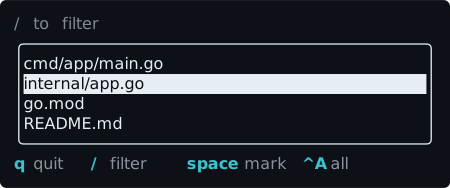
By default (scope="active"), a hint shows only while one of its keys would actually fire, through the same key handling the app uses. Press / and focus moves to the input, which takes q, /, space, and ctrl+a for itself, so only the hint that still applies is left:
/ to filter
╭──────────────────────────────────────────╮
│cmd/app/main.go                           │
│internal/app.go                           │
│go.mod                                    │
│README.md                                 │
╰──────────────────────────────────────────╯
esc done
scope="all" lists every hint, for a help screen. Items are laid out along the row (or down it with layout: column), and the ones that do not fit are dropped from the end. Style them with .hint-key and .hint-label.
modal
A layer over the screen, open while open is truthy.
<tui>
  <style>
    #confirm { width: 34; height: auto; }
    #actions { height: 1; gap: 2; justify: center; }
    button:focus { reverse: true; }
  </style>
  <screen id="main" focus="#yes">
    <text>the files you marked</text>
    <modal id="confirm" title="delete 2 files?" open="true" on:escape="cancel">
      <text>This cannot be undone.</text>
      <row id="actions">
        <button id="yes" label="delete" on:click="delete"/>
        <button id="no" label="cancel" on:click="cancel"/>
      </row>
    </modal>
  </screen>
</tui>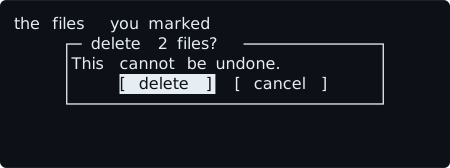
- A modal is centered, 80% by 80% of the screen unless sized, with a single border by default and its
titleon it. - It traps focus while open, gives it back when it closes, and fires
on:open,on:close, and, onesc,on:escape. - A modal must be the last child of its screen (
L004). Several can be open; the last one in the document is on top. - Give the button row
height: 1. Rows stretch across the modal by default, and a focusedreversebutton would paint the whole stretched rect. focus="#id"(version="3") names the node that takes focus when the modal becomes the top one, instead of the first entry of its focus cycle; the target must be inside the modal. It also doubles as the fallback when the node focused inside the modal is lost (it leaves the frame or can no longer take focus): focus goes to it when it still can take focus, else to the first entry of the cycle as usual.
scroll, rule, spacer
<scroll id="log" axis="y" focusable="true" title="log">
  <text wrap="wrap">{log}</text>
</scroll>
<rule/>
<row>
  <text>left</text>
  <spacer/>
  <text>right</text>
</row>scrollclips and scrolls its content; withfocusable="true"it takes the arrow and paging keys. See scrolling.ruleis a one-cell line, horizontal by default (axis="y"for vertical).spacertakes the free space in a row or column, pushing its siblings apart.